

Chapter Registrar Guide
Welcome registrar!
This introductory page will serve as a guide as you learn the Claims processes that are unique to our organization. The main page, our CDA “Claims Corner” will contain every Claims document you might need, while this page will serve as an introduction for the registrar transition with a few key documents to get you started.
It is critical to read through all these documents to understand the various claims processes and comply with submission guidelines for candidates. The latest versions of these documents, including blank application forms, will always be available on the website, so it is important you are working with the latest version from there.
We recommend you download the key files to your computer, to share with your candidates and to have whenever needed. Please note that mailed documents are no longer accepted. All submissions must be via email or Dropbox, in editable PDF format.
We hope the steps below help to explain the process a bit, but if there are any questions, the Claims Department can be reached at claims@cda1890.org
Transition
The first step of the process it to ensure you have all the relevant documents from the outgoing registrar. This will include prospective members, candidates who have been voted in by the board, and candidates who are already in the application process. Please make sure she has given you any papers that are currently in the process, and has updated you on the status of any outstanding applications.
If, for any reason, the outgoing registrar does not have this information, please email the Claims Department for our list of where your Chapter’s candidates stand. We will only have the information for candidates who have submitted paperwork, but will be happy to share the information that we have, and where those candidates stand.
The New Member Process
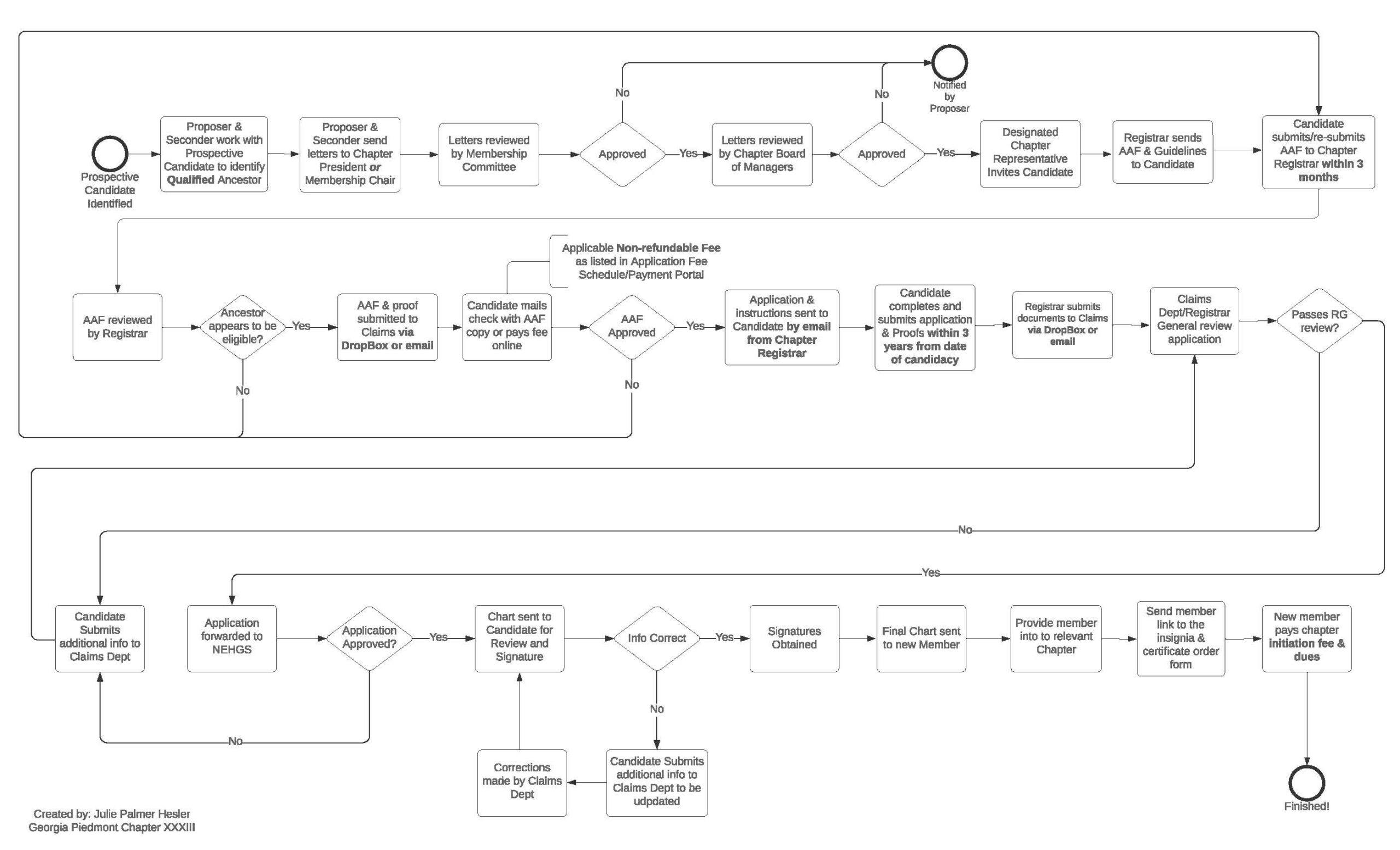
The process to invite and approve a member into CDA is multi-step, involving coordination between the candidate, Registrar, and the office. Chapter Registrars act as verifiers for the information submitted by candidates, and as intermediaries between the candidates and the Claims Department. It is up to the Registrar to ensure the candidate has submitted all required documentation, and that all forms have been filled out correctly according to our guidelines, and sent in full to the Claims Department. Before anything is sent to the office, however, a few steps happen within your chapter.
The general process is outlined here.
Candidacy
The basic process is similar for every chapter, though there are variations. The following requirements are based on the Parent Chapter’s guidelines. Contact your chapter’s leadership to confirm your chapter’s specific requirements.
In order for your prospective member to be considered by the Chapter Board (or Membership Committee, if applicable), she must have fulfilled the following:
1. Attended at least one CDA event (though it is preferable to have attended more);*
2. Met at least two members of the Chapter Board (or Membership Committee);
3. Had two letters submitted on her behalf.
Please read the full guide below, for more information on the process of proposing a candidate. As stated, different chapters may have different requirements, so please contact your Chapter President or Board for more information.
Please be aware that your candidate has three years to complete her papers from the date of candidacy. Individual chapters may opt to have a shorter candidacy deadline, so please confirm with your Chapter. If she fails to complete her papers within that timeline, she will be dropped. If she wishes to join again after being dropped, she must restart the process including resubmitting all paperwork and fees, so please ensure your candidate is ready and able to complete the work needed.
The candidacy process is only for the chapter. The Claims Department does not need to be sent letters, or be informed of Chapter Board votes.
Ancestor Approval
Once the Chapter Board has approved your candidate, you can begin work on the first form to submit. Before being voted in, your candidate should have had an eligible ancestor in mind, and had reviewed the Ancestor Eligibility List.
Ancestor Eligibility List (4.1.2022)
With this ancestor, it is time to complete the Ancestor Approval Form. Once your candidate has been voted on by the Chapter Board, you can send her the Ancestor Approval Form (AAF), and Ancestor Approval Form Guide. This form is for her to complete, but must be reviewed by you to ensure she has followed the guide.
Ancestor Approval Form Guide (9.29.2022)
Ancestor Approval Form (9.29.2022)
Your candidate should submit to you her completed AAF, along with the service proofs, primary documents proving the eligibility of her ancestor. Once you have ensured all materials are in order, three things can be submitted to the Claims Department:
-
-
-
-
-
-
- the completed AAF
- Service Proofs
- AAF Fee
-
-
-
-
-
The AAF Fee must be submitted at the same time as the AAF, either by check, or online through the portal below. Regular application fee is $250, but please review the attached document for other application types. These fees can either be paid directly by the applicant, or by the Chapter Treasurer (depending on your chapter’s procedures), but it is the responsibility of the Registrar to ensure the fee has been sent in.
Please note: All documents submitted must be in editable PDF format. The AAF will not be accepted if it is not editable. Please see the section at the bottom of this page for a breakdown of editable vs non-editable documents.
Application
After the AAF materials have been received, you will either receive an approval or rejection notice from the office. In the case of rejection, the office will let you know the reason, and if more information is needed, or a new ancestor. If the materials are approved, you will receive notice via email along with the Registrar Checklist. You and your candidate may then begin the full application.
Membership Application Guide (9.29.2022)
Membership Application (6.11.2026)
You and your candidate should both review the application and guide in full. Please note that just because materials were accepted for other lineage groups, does not mean they are necessarily acceptable for CDA. What documents are acceptable proofs for generations are listed within the guide. Some common problems to note are:
- Generations 1-3 must include official birth, death, and marriage certificates for each listed couple. The items acceptable for later generations are not acceptable for generations 1-3. If official certificates are not available for any reason, this issue must be noted in the application with supplementary proof, but may still be grounds for rejection.
- Census reports are not acceptable proofs for birth, death, marriage, or generation connection. They can work as supplementary proofs, but not the main piece of evidence.
- All handwritten documents must have their underlined portions transcribed. If a handwritten document is in print and clear as day, it can be submitted as is, but legibility is at the discretion of the Claims Department, so we advise erring on the side of caution and to submit transcriptions. If any words need to be guessed at, inferred, or examined closely to be read, the document needs a transcription to be accepted by the verifying genealogist.
Please note that the completion of the application is ultimately your candidate’s responsibility. If she decides to hire a genealogist, that is perfectly fine, but procuring the documents and tracing her lineage should not be left up to you. Of course, if you choose to be heavily involved in the process, and use your genealogical knowledge with your candidates, that is up to you, but please do not feel you have to prepare the papers for your candidate. You are a resource to guide her through the process and ensure her materials are adequate.
Once your candidate’s application and proofs are completed, it is your turn to review them in full. The Registrar’s Checklist will be helpful here.
Registrar Checklist (7.25.2024)
Besides making sure all materials are submitted according to our guidelines, and that the lineage proofs are sufficient, there are a few formatting things to take note of. While everything on the Registrar Checklist must be evaluated, here are the most common issues we see:
Application
- The application must be submitted in editable PDF format. If it is not editable, it will be returned.
- The names listed on the application must match the ones given on the proof documents. If an ancestor went by a nickname, and all the documents reference that nickname, please list it on the application. If half of the documents refer to a nickname, and half refer to a legal name, there must be some proof that these are the same person even if it is a common nickname for the legal name (Frances to Fanny, for example). If the nickname is just a shortening of the legal name (Samuel to Sam, for example), this can be ignored. We cannot assume these are the same people just because it says so on the application.
- Please remember that the application outlines your candidate’s ancestry, but it is not, in itself, the proof. If the evidence is not clear within the documents, it does not hold up just because it is listed in the application.
Proofs
- Proofs must be sent sorted via generation in ascending order and follow the application. One large document for all generations is acceptable, as is one document per generation (i.e.. 12 generations,12 documents). JPEG images, word documents, and separate PDFs are not acceptable. Additionally, the proofs must be sorted according to how they appear in the application. If the application lists “b/c, m/c, d/c”, the proofs must follow that order.
- All pertinent information within the proof must be underlined in red. Documents like wills and deeds should be submitted in full, but please underline the relevant information for easy access.
- Documents must be labelled by generation, especially if the proofs are submitted in one large document. Though we go through every document, we should also be able to tell, at a glance, what items are there, and which are not.
- Excerpts from books must include the title page, which shows the title, author, and publication date. Scans of wills, deeds, Bibles, and other records must include the name of the document at the top of the scan.
Please remember when signing the checklist, that your signature is your word. It is immensely clear when reviewing, who has read the checklist and application, and who has not.
Once the application, proofs, and checklist have been reviewed and approved by you, they can be submitted to the Claims Department. These documents can be submitted via email, or if they are too large, via Dropbox. They can be sent/shared to claims@cda1890.org. If they are shared by Dropbox, it is always helpful to send an email to let us know the items have been shared that way. We usually get a notification for items shared, but an email ensures nothing is missed and that your documents are downloaded immediately.
We always welcome a friendly status check-in, if you are curious to see where your candidate’s application stands, but in most cases, it is simply in the queue to be reviewed. Applications are reviewed in the order they are received, so please know that if there is a delay, it is likely due to a backlog of applications and we are working as quickly as possible to review them.
If there are any questions, concerns, or clarifications before submitting your application, please do not hesitate to reach out. We’d be more than happy to answer any questions to ensure your application is submitted in the most complete format it can be. Most applications have to wait a bit before they are reviewed, so it is important to ensure all items are submitted properly to prevent them being returned and having to wait again.
Please note: Registrars are an intermediary between candidates and the Claims Department. We know candidates are eager to hear back, and will often have many questions for you about their status, but please do not have them reach out to us directly to check in. If they are providing additional materials, that is fine, but emails from candidates asking for status updates from us slows the process down tremendously.
Approval
Congratulations! Your candidate’s application has been approved, and she is now officially a member of CDA! You and your candidate will be informed together, via email from us. The “welcome” email will have her date of approval (something your Chapter might ask you to note), and a notice that her “Final Chart” will be arriving for signature. This Final Chart is what we call the application once it has been approved and includes any adjustments made by the genealogist. It is the version of the application that has been accepted, and may or may not differ slightly from what was submitted, so please do save this new copy. The Final Chart also includes a signature page, the last page of the document, that awaits you and your candidate’s signatures. This will be sent via Adobe e-sign, where you both can separately add your digital signature. Once both you and your candidate have signed the document, Adobe will email you each a copy, which you can save in her file. This will be the version needed should she ever decide to submit a supplemental application, or should her daughters want to join as a legacy candidate.
Please note: the application process is not considered complete until we have received both signatures. If you have not received the notice from Adobe with the signed copy, please make sure your candidate has completed her signature. If you have ensured both signatures are completed and still not received the notification, please reach out the Claims Department.
Rejection
If your candidate’s application cannot be approved for any reason, you will receive an email from the Claims Department. This email will outline additional proofs needed, dubious sources, missing information, or unfulfilled guideline requirements. You can then work with your candidate to procure the additional documents, and to rework her application. If additional documents are added, the application must be updated to include these new documents.
Please be aware, in most cases, if an application is resubmitted after an initial review, it will go back in the queue. This is another reason to ensure all guidelines are followed as closely as they can be, as the application will once again have to wait to be reviewed. If only one minor change was needed (a single birth certificate, for example) or the turnaround is extremely fast (a matter of days), we may not yet have moved on to another application, but this is extremely rare, so please be aware that the resubmitted application will once again need to wait its turn.
It is always helpful to resubmit with completely updated proofs and applications. If just one document is needed, it can be tacked on easily, but if a number are submitted, please resubmit the proof documents with the new documents added in their correct location, just as you would have in the initial submission. This will ensure the speediest review process possible.
Should the new documents suffice, you will then receive notice of approval, and begin the approval process (see above), but if not, we will let you know.
Editable vs Non-Editable Documents
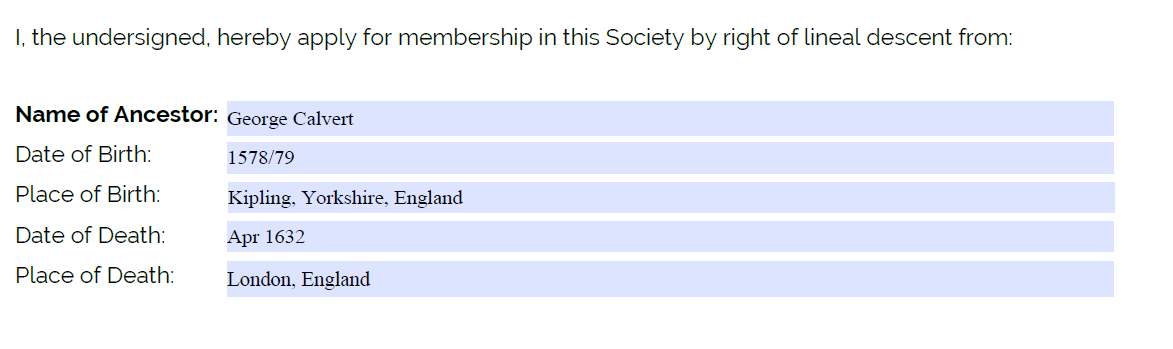
All documents downloaded from the website are automatically in editable format. This means that there are text boxes for you and your applicant to insert information as needed. These text boxes will appear on most screens as blue boxes. Here is an example of the Membership Application in editable format:
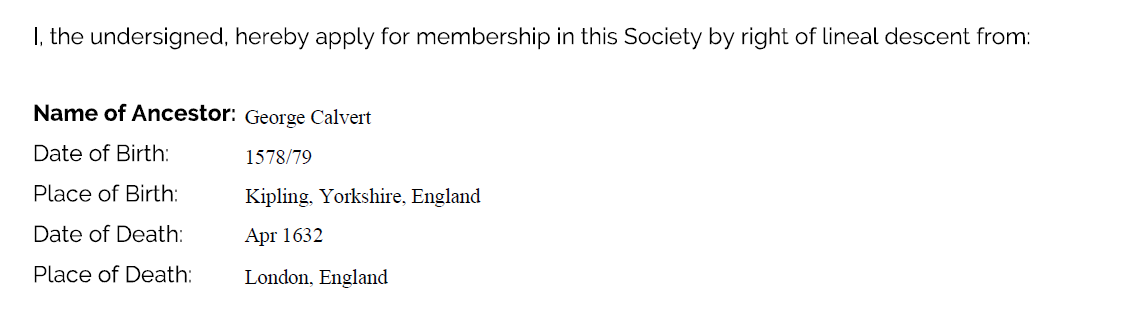
Once you and your applicant have filled out the information, you can simply save the document, and attach it in an email or Dropbox. Do not click “Save as PDF” or “Print to Desktop”. These options flatten the document and make it un-editable, preventing both the office and verifying genealogist from making corrections. Here is an example of what the Membership Application looks like in un-editable format:
An AAF and application received in un-editable format will always be returned, so please be sure to submit it correctly. If your candidate submits the form to you in un-editable format, please be sure to reach out to her for an editable version.